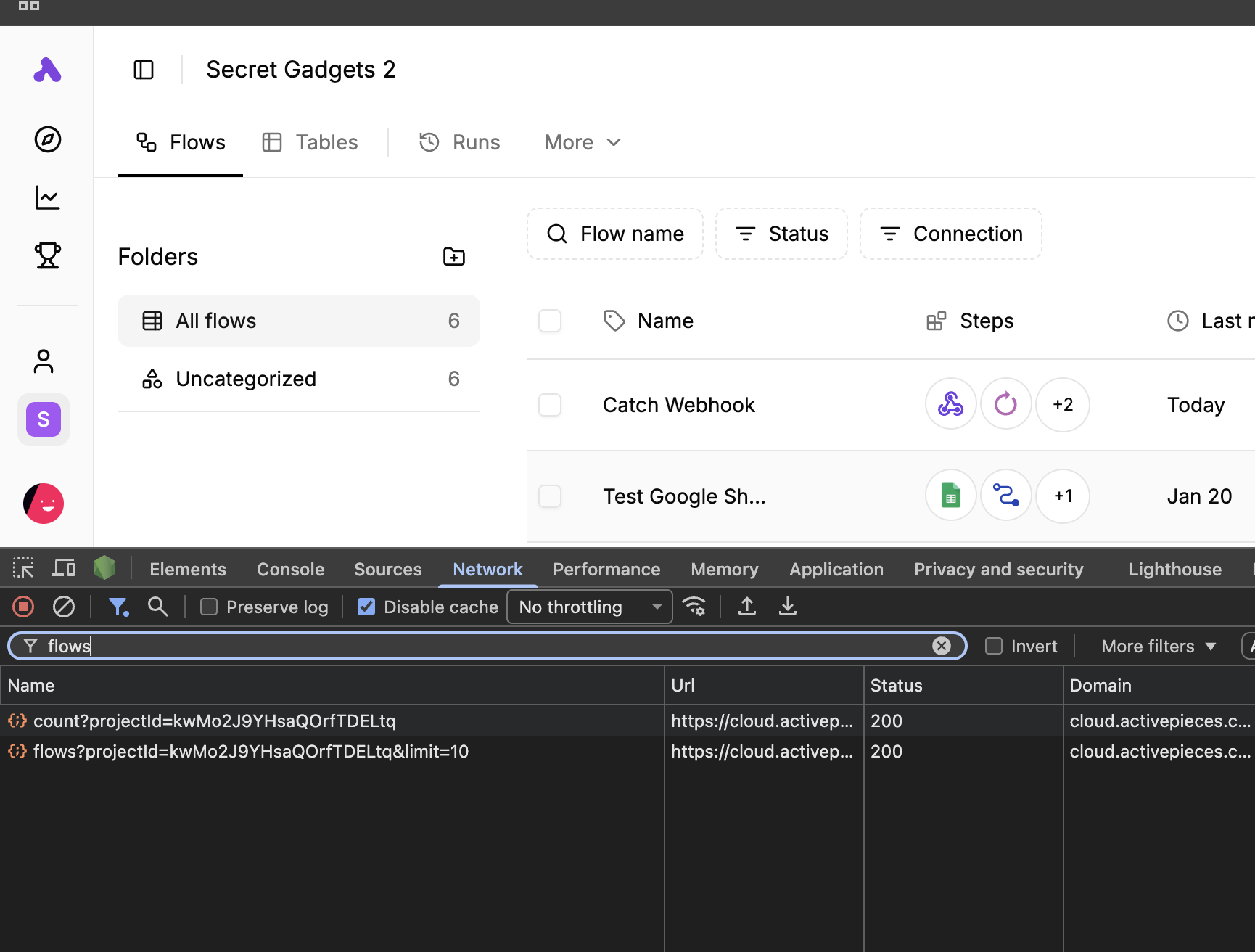
Flows list is empty after upgrade, but webhooks/runs still work (self-hosted on Coolify)

Hi! I’m running Activepieces self-hosted on Coolify and after an upgrade my instance is in a weird state:

  • The Flows page shows No flows found.
  • On the left sidebar I still see the correct folder + flow counters (e.g. “All flows 29”, “allsign events 5”, etc.).
  • My existing flows still run correctly: when I hit my webhooks / events, the automations execute and I can see new entries in the Runs tab.

So the flows definitely exist in the database, but the list endpoint / UI is not showing them.

What I changed

  1. I updated my Activepieces service in Coolify and it pulled a newer image.
  2. The Postgres container started failing with this error:

in 18+, these Docker images are configured to store database data in a format which is compatible with “pg_ctlcluster”…
Counter to that, there appears to be PostgreSQL data in: /var/lib/postgresql/data
This looks like the classic Postgres 18 + existing data dir problem (data was originally created on an older Postgres).

  1. To fix that I:
  • Pinned Postgres to a specific version (for now I’m using postgres:17, so it can read the existing data dir again).
  • For Activepieces I set an explicit tag instead of latest, e.g.:
ghcr.io/activepieces/activepieces:0.72.4
  1. After that, the stack comes up fine, Postgres is healthy, Activepieces starts, webhooks work and runs are created.

But now the Flows list is empty, even though the folders and run history clearly “know” the flows are there.

Current symptoms

  • Flows sidebar shows the correct number of flows per folder.
  • Main table in Flows tab always shows “No flows found”.
  • Existing webhooks still point to valid flows and run successfully.
  • The issue started right after the image / Postgres version changes above.
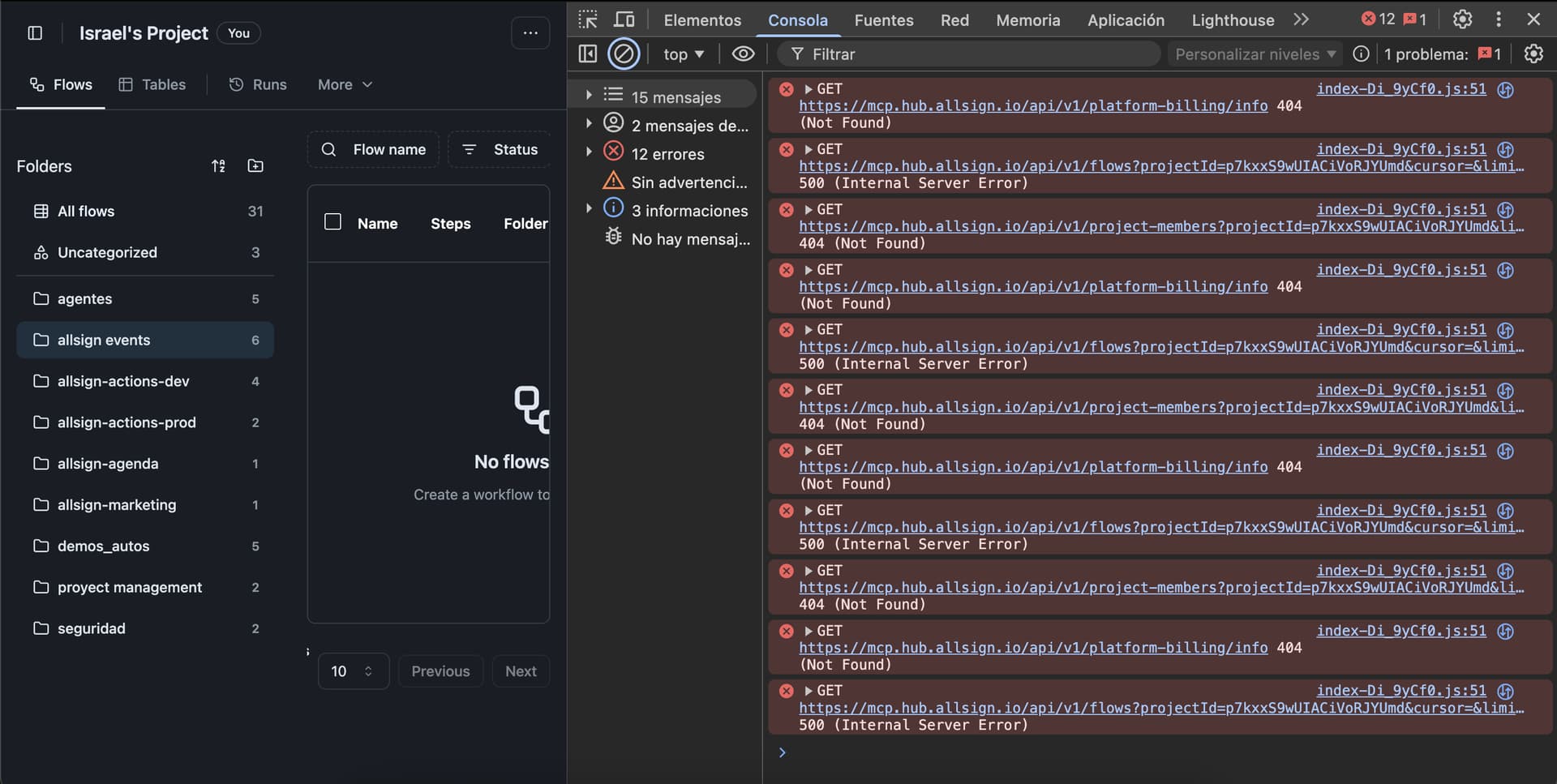
    I will share my browser console with current errors:

Questions

  1. Is this a known issue when:
  • upgrading Activepieces and Postgres, and then
  • pinning tags (possibly after migrations already ran)?
  1. Is there any recommended combination of image tags (Activepieces + Postgres) for an existing database created on older versions?
  2. Is there any manual migration / repair step I can run to make the flows list work again without losing my existing flows?
  3. As a last resort, is there a documented way to export flows from the database (given that they still run) and re-import them into a clean instance?

Any guidance would be really appreciated – my automation stack depends 100% on this instance, so I’d like to fix it properly without losing data.

Hi @binaryme

The issue seems in listing flows endpoint, the data is there.

Consider upgrading to activepieces versions · activepieces · GitHub

I think it includes the fix, we will do offical release soon.

@abuaboud I’m having the same issue after upgrading - 0 flows or anything displayed in UI but existing webhook is triggering as it should.

Upgrading to the 0.73.0-rc.1 didn’t fix issue.

@abuaboud upgrading to 0.73.0-rc.1 didn’t resolve the issue. After the upgrade, the server fails to restart and shows the following error in the logs:

ry":"\n            ALTER TABLE \"flow_run\" DROP COLUMN \"tasks\"\n        ","driverError":{"type":"DatabaseError","message":"column \"tasks\" of relation \"flow_run\" does not exist","stack":"error: column \"tasks\" of relation \"flow_run\" does not exist\n    at /usr/src/app/dist/packages/server/api/node_modules/pg/lib/client.js:526:17\n    at process.processTicksAndRejections (node:internal/process/task_queues:95:5)\n    at async PostgresQueryRunner.query (/usr/src/app/dist/packages/server/api/node_modules/typeorm/driver/src/driver/postgres/PostgresQueryRunner.ts:254:25)\n    at async UnifyCommunityWithEnterprise1764567780604.up (/usr/src/app/packages/server/api/src/app/database/migration/postgres/1764567780604-UnifyCommunityWithEnterprise.ts:285:9)\n    at async MigrationExecutor.executePendingMigrations (/usr/src/app/dist/packages/server/api/node_modules/typeorm/migration/src/migration/MigrationExecutor.ts:336:17)\n    at async DataSource.runMigrations (/usr/src/app/dist/packages/server/api/node_modules/typeorm/data-source/src/data-source/DataSource.ts:404:13)\n    at async DataSource.initialize (/usr/src/app/dist/packages/server/api/node_modules/typeorm/data-source/src/data-source/DataSource.ts:273:17)\n    at async initializeDatabase (/usr/src/app/packages/server/api/src/app/database/index.ts:5:5)\n    at async Redlock.using (/usr/src/app/dist/packages/server/api/node_modules/redlock/src/index.ts:742:14)\n    at async main (/usr/src/app/packages/server/api/src/main.ts:61:9)","length":117,"name":"error","severity":"ERROR","code":"42703","file":"tablecmds.c","line":"9012","routine":"ATExecDropColumn"},"length":117,"severity":"ERROR","code":"42703","file":"tablecmds.c","line":"9012","routine":"ATExecDropColumn"},"msg":"[Main#main]"}
2025-12-07T12:06:58.572071026Z AP_APP_TITLE: Activepieces
2025-12-07T12:06:58.572086266Z AP_FAVICON_URL: https://cdn.activepieces.com/brand/favicon.ico
2025-12-07T12:06:58.574842514Z Starting backend server with Node.js (WORKER mode or default)
2025-12-07T12:07:04.196965974Z Migration "UnifyCommunityWithEnterprise1764567780604" failed, error: column "tasks" of relation "flow_run" does not exist
2025-12-07T12:07:04.762183822Z {"level":50,"time":1765109224199,"pid":10,"hostname":"54d19a3756a6","err":{"type":"QueryFailedError","message":"column \"tasks\" of relation \"flow_run\" does not exist","stack":"QueryFailedError: column \"tasks\" of relation \"flow_run\" does not exist\n    at PostgresQueryRunner.query (/usr/src/app/dist/packages/server/api/node_modules/typeorm/driver/src/driver/postgres/PostgresQueryRunner.ts:325:19)\n    at process.processTicksAndRejections (node:internal/process/task_queues:95:5)\n    at async UnifyCommunityWithEnterprise1764567780604.up (/usr/src/app/packages/server/api/src/app/database/migration/postgres/1764567780604-UnifyCommunityWithEnterprise.ts:285:9)\n    at async MigrationExecutor.executePendingMigrations (/usr/src/app/dist/packages/server/api/node_modules/typeorm/migration/src/migration/MigrationExecutor.ts:336:17)\n    at async DataSource.runMigrations (/usr/src/app/dist/packages/server/api/node_modules/typeorm/data-source/src/data-source/DataSource.ts:404:13)\n    at async DataSource.initialize (/usr/src/app/dist/packages/server/api/node_modules/typeorm/data-source/src/data-source/DataSource.ts:273:17)\n    at async initializeDatabase (/usr/src/app/packages/server/api/src/app/database/index.ts:5:5)\n    at async Redlock.using (/usr/src/app/dist/packages/server/api/node_modules/redlock/src/index.ts:742:14)\n    at async main (/usr/src/app/packages/server/api/src/main.ts:61:9)","query":"\n            ALTER TABLE \"flow_run\" DROP COLUMN \"tasks\"\n        ","driverError":{"type":"DatabaseError","message":"column \"tasks\" of relation \"flow_run\" does not exist","stack":"error: column \"tasks\" of relation \"flow_run\" does not exist\n    at /usr/src/app/dist/packages/server/api/node_modules/pg/lib/client.js:526:17\n    at process.processTicksAndRejections (node:internal/process/task_queues:95:5)\n    at async PostgresQueryRunner.query (/usr/src/app/dist/packages/server/api/node_modules/typeorm/driver/src/driver/postgres/PostgresQueryRunner.ts:254:25)\n    at async UnifyCommunityWithEnterprise1764567780604.up (/usr/src/app/packages/server/api/src/app/database/migration/postgres/1764567780604-UnifyCommunityWithEnterprise.ts:285:9)\n    at async MigrationExecutor.executePendingMigrations (/usr/src/app/dist/packages/server/api/node_modules/typeorm/migration/src/migration/MigrationExecutor.ts:336:17)\n    at async DataSource.runMigrations (/usr/src/app/dist/packages/server/api/node_modules/typeorm/data-source/src/data-source/DataSource.ts:404:13)\n    at async DataSource.initialize (/usr/src/app/dist/packages/server/api/node_modules/typeorm/data-source/src/data-source/DataSource.ts:273:17)\n    at async initializeDatabase (/usr/src/app/packages/server/api/src/app/database/index.ts:5:5)\n    at async Redlock.using (/usr/src/app/dist/packages/server/api/node_modules/redlock/src/index.ts:742:14)\n    at async main (/usr/src/app/packages/server/api/src/main.ts:61:9)","length":117,"name":"error","severity":"ERROR","code":"42703","file":"tablecmds.c","line":"9012","routine":"ATExecDropColumn"},"length":117,"severity":"ERROR","code":"42703","file":"tablecmds.c","line":"9012","routine":"ATExecDropColumn"},"msg":"[Main#main]"}
2025-12-07T12:08:05.025692092Z AP_APP_TITLE: Activepieces
2025-12-07T12:08:05.025714652Z AP_FAVICON_URL: https://cdn.activepieces.com/brand/favicon.ico
2025-12-07T12:08:05.028290500Z Starting backend server with Node.js (WORKER mode or default)
Forward it to the team, expect it to be fixed in the next release

Hi can you please upgrade to 0.73.0, It’s released now

Having the same issue on 0.73.0, self-hosted.

Flow list was displaying correctly to start. After clicking the “Explore” menu at the top left my flow list, run list, etc. has all disappeared. I believe this is also what happened on the last version.

Spent a bunch of time today trying to get things back to normal with not much luck. Was able to restore a backup with an old version but only partially. Downloaded my flows while I was able to but was unable to get most of the functionality working (lack of skill issue on my part I’m sure, this stuff isn’t my strong suit).

Installation on the latest version is still the same, empty flow list but all webhooks and connections appear to be working. In trying to start the container with docker run and the new AP_DB_TYPE=PGLITE environment variable I get an error - “SYSTEM_PROP_NOT_DEFINED: System property AP_POSTGRES_DATABASE is not defined.”

Is the AP_POSTGRES_DATABASE variable necessary when using the embedded database?

Hoping for some direction or a fix soon.

Also still not seeing my old flows (only ones created since updating to newer version).

The webhook on one of the old missing flows is still triggering but its not available in the project flows list.

I like this Activepieces software but it doesnt give me much confidence if flows could be lost/disappear after upgrades.

Did you have some success with this issue ? I also can not see my flows while they are still running. My current version is 0.77.3 and Pikapod hosts it.

I did not have success with this. Tried several of the versions released after encountering the issue and eventually just had to start fresh with a new installation.

@abuaboud can you help ? :pray:

Hi @nicotentin

Please open inspect element window by right click then go to the network tab and look if the /flows is failing, If you tell us what do you see on the response tab.

Thanks for caring. Is this what you need ?

14:06:58,291 Cross-Origin Request Blocked: The Same Origin Policy disallows reading the remote resource at https://partnerlinks.io/pr/grc/pk_hXXmQVEnpqPOxa9D1sD085zFWUWbpwd9. (Reason: CORS request did not succeed). Status code: (null).
14:06:58,307 Cross-Origin Request Blocked: The Same Origin Policy disallows reading the remote resource at https://grsm.io/pr/grc/pk_hXXmQVEnpqPOxa9D1sD085zFWUWbpwd9. (Reason: CORS request did not succeed). Status code: (null).
14:06:58,847 isEmbedded false index-DUIfZo78.js:1578:37228
14:06:58,963 Telemetry enabled index-DUIfZo78.js:81:180372
14:06:59,084 isEmbedded false index-DUIfZo78.js:1578:37228
14:06:59,213 Cross-Origin Request Blocked: The Same Origin Policy disallows reading the remote resource at https://cdn.segment.com/v1/projects/Znobm6clOFLZNdMFpZ1ncf6VDmlCVSmj/settings. (Reason: CORS request did not succeed). Status code: (null).
14:06:59,213 NetworkError when attempting to fetch resource. index-DUIfZo78.js:79:134800
    uUt https://anonymized.pikapod.net/assets/index-DUIfZo78.js:79
    (Asynchrone : promise callback)
    uUt https://anonymized.pikapod.net/assets/index-DUIfZo78.js:79
    gUt https://anonymized.pikapod.net/assets/index-DUIfZo78.js:79
    c https://anonymized.pikapod.net/assets/index-DUIfZo78.js:79
    a https://anonymized.pikapod.net/assets/index-DUIfZo78.js:79
    dr https://anonymized.pikapod.net/assets/index-DUIfZo78.js:79
    dr https://anonymized.pikapod.net/assets/index-DUIfZo78.js:79
    gUt https://anonymized.pikapod.net/assets/index-DUIfZo78.js:79
    n https://anonymized.pikapod.net/assets/index-DUIfZo78.js:79
    (Asynchrone : promise callback)
    n https://anonymized.pikapod.net/assets/index-DUIfZo78.js:79
    e https://anonymized.pikapod.net/assets/index-DUIfZo78.js:79
    t https://anonymized.pikapod.net/assets/index-DUIfZo78.js:79
    load https://anonymized.pikapod.net/assets/index-DUIfZo78.js:79
    d https://anonymized.pikapod.net/assets/index-DUIfZo78.js:81
    v8t https://anonymized.pikapod.net/assets/index-DUIfZo78.js:81
    TF https://anonymized.pikapod.net/assets/index-DUIfZo78.js:41
    w_ https://anonymized.pikapod.net/assets/index-DUIfZo78.js:41
    GEe https://anonymized.pikapod.net/assets/index-DUIfZo78.js:41
    $0 https://anonymized.pikapod.net/assets/index-DUIfZo78.js:39
    H_t https://anonymized.pikapod.net/assets/index-DUIfZo78.js:41
    s1 https://anonymized.pikapod.net/assets/index-DUIfZo78.js:41
    QEe https://anonymized.pikapod.net/assets/index-DUIfZo78.js:41
    _ https://anonymized.pikapod.net/assets/index-DUIfZo78.js:26
    M https://anonymized.pikapod.net/assets/index-DUIfZo78.js:26
    (Asynchrone : EventHandlerNonNull)
    lCt https://anonymized.pikapod.net/assets/index-DUIfZo78.js:26
    lCt https://anonymized.pikapod.net/assets/index-DUIfZo78.js:26
    cCt https://anonymized.pikapod.net/assets/index-DUIfZo78.js:26
    uCt https://anonymized.pikapod.net/assets/index-DUIfZo78.js:34
    h9e https://anonymized.pikapod.net/assets/index-DUIfZo78.js:41
    dCt https://anonymized.pikapod.net/assets/index-DUIfZo78.js:41
    <anonyme> https://divergent-koele.pikapod.net/assets/index-DUIfZo78.js:41
14:07:02,525 connected to socket index-DUIfZo78.js:1072:46067
14:07:02,647 isEmbedded false

Hi @nicotentin

Nope we want the flows request, click on it then click on response tab

Hope this is useful this time :

Do you need something else @abuaboud ?

Hi @nicotentin

Sorry for late reply, There is no errors on the list endpoint I assume this is different issue reported in this thread.

I am not sure how we can reproduce this :smiling_face_with_tear: If you are tech savvy it would be great If you can check if the flows are in the database (table flows) and check the content of (table projects)
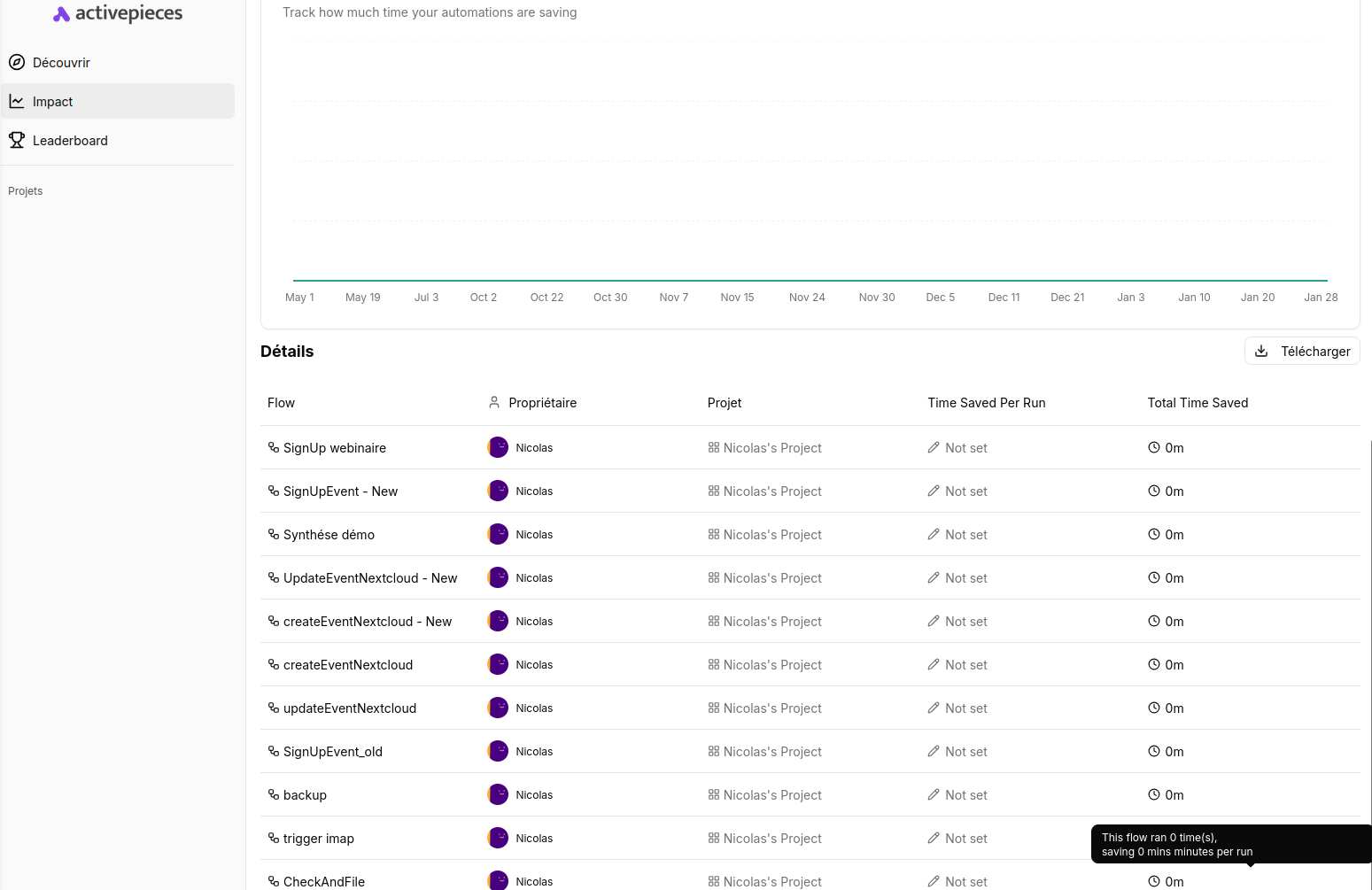
I am sure they are stil there as they are currently working and I can see them on impact page :

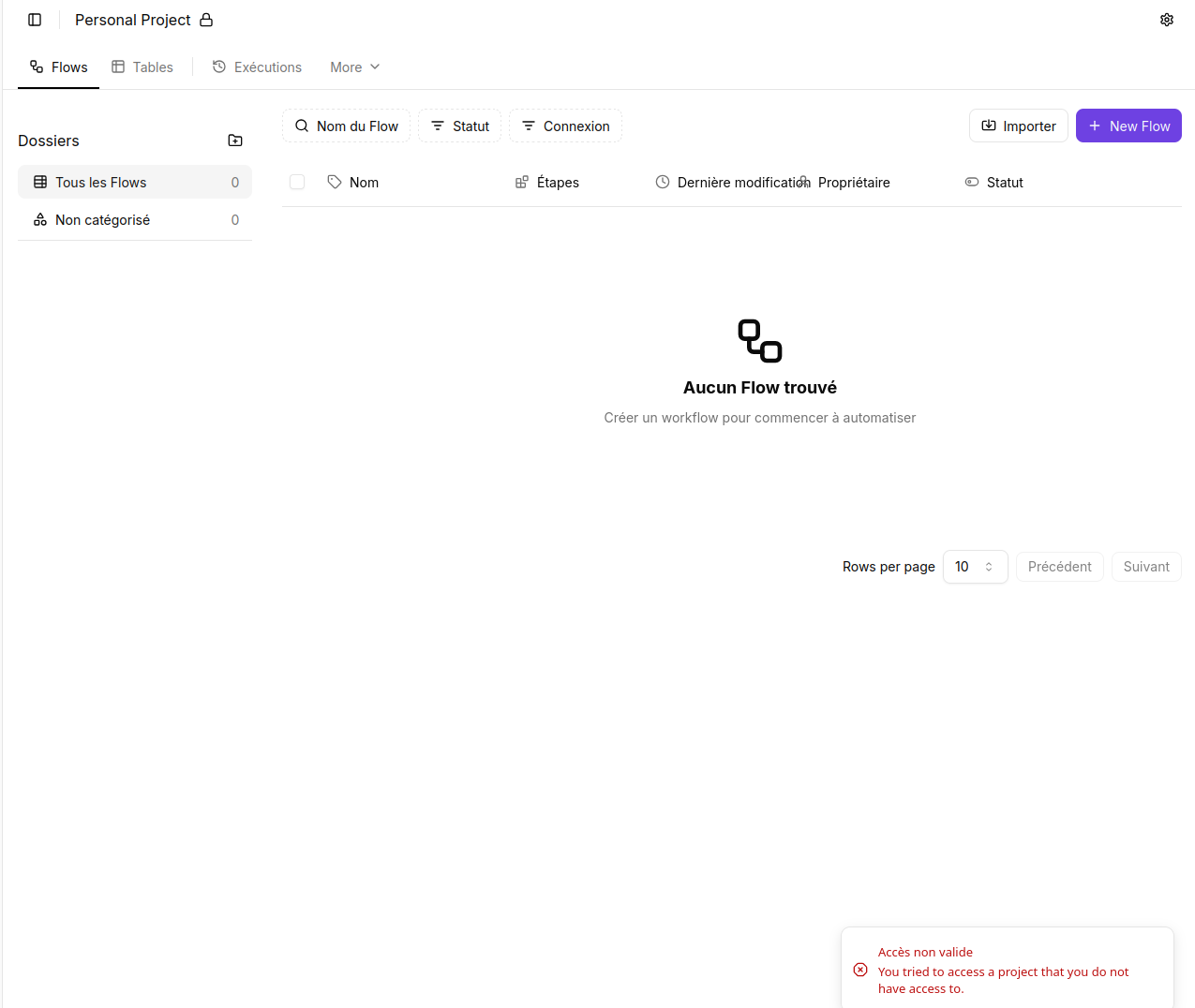
If I click on a flow, here is the result :