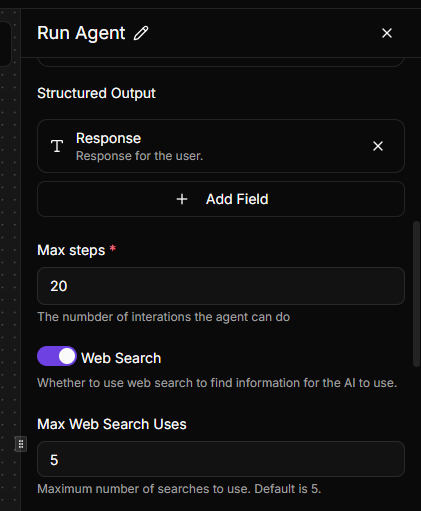
I have tried the Web Search capability in the “Ask AI” action from the AI Piece, and it works great. Consumes a lot of credits, but this is to be expected.
My question is, in the “Run Agent” action, how can I provide the Agent with Web Search capability as well? There is no toggle like with Ask AI, and from my tests, it seems it’s disabled by default.
I know we can add Piece Tools, but they all require separate subscriptions. Yet my AI provider (Claude) already has Web Search enabled (as evidenced by the fact that I used it in the “Ask AI” action), so why can’t I use it directly?
Am I missing something here? I also though about creating an MCP Flow that acts a a simple “wrapper” of Ask AI with Web Search enabled, but I don’t know if it’ll work, and if it does, it might be overkill. Any guidance would be appreciated.
My read is that Run Agent does not inherit the same built-in web search toggle that Ask AI exposes, so if you want live retrieval you usually need to make it explicit.
A few practical options:
Add a web-search-capable tool to the agent and tell the prompt when to call it.
Wrap Ask AI in a small helper flow, like you mentioned, then let the agent call that flow only when freshness matters.
Split the workflow into two steps: gather search results first, then pass the cleaned context into Run Agent.
In practice, option 3 is usually the easiest to debug because you can see exactly what context the agent received, and it also gives you more control over credit usage.
If you want, I’d test with one narrow query first and compare:
search step → summarize → pass into Run Agent
MCP/flow wrapper around Ask AI
That should tell you pretty quickly which path is cheaper and more reliable for your use case.
Thanks for the reply. After posting this, I actually attempted option #2, but I kept getting errors where the main flow was not passing the input parameters to the subflow correctly. I didn’t explore it further, and then when I tested a few days ago, I noticed that the Run Agent Action seems to have been silently updated with the “Web Search” toggle and all related parameters.